JUST LEARNING - HACKING - OS
WHAT'S NEW?
Loading...

All these tools come bundled in pentesting Linux distro’s such as Kali Linux or BackBox, so we’d certainly recommend that you install an appropriate Linux hacking box to make your life easier – not least because repositories are (automatically) updated.


Used to Scan Ports and Map Networks - and a whole bunch more!
nmap tools


Nmap is an abbreviation of 'Network Mapper', and it's very well known free open source hackers tool. Nmap is mainly used for network discovery and security auditing. Literally, thousands of system admins all around the world will use nmap for network inventory, check for open ports, manage service upgrade schedules, and monitor host or service uptime. Nmap, as a tool uses raw IP packets in creative ways to determine what hosts are available on the network, what services (application name and version) those hosts are providing information about, what operating systems (fingerprinting) and what type and version of packet filters/ firewalls are being used by the target. There are dozens of benefits of using nmap, one of which is that fact that the admin user is able to determine whether the network (and associated nodes) need patching. Nmap's been featured in literally every hacker movie out there, not least the recent Mr. Robot series. It's also worth mentioning that there's a GUI version of Nmap called 'Zenmap'. We'd advise you to learn using Nmap (i.e. the 'command line') then rotate into Zenmap when you are feeling all confident.

Metasploit Penetration Testing Software | Free & Paid
Vulnerability Exploitation Tool

The Metasploit Project is a hugely popular pentesting or hacking framework. If you are new to Metasploit think of it as a 'collection of hacking tools and frameworks' that can be used to execute various tasks. Widely used by cybersecurity professionals and ethical hackers this is a tool that you have to learn. Metasploit is essentially a computer security project (framework) that provides the user with vital information regarding known security vulnerabilities and helps to formulate penetration testing and IDS testing plans, strategies and methodologies for exploitation. There's a ton of incredibly useful Metasploit information out there and we hope that the books that we've chosen go someway to help you on your journey, not least if you are a beginner just starting out and looking for beginners tutorials in how to use Metasploit.

THC Hydra | Free
Password Cracking Tool

We've purposely placed THC Hydra underneath John The Ripper because they often go 'hand-in'hand'. THC Hydra (we've abbreviated to simply 'Hydra' throughout our site) is a hugely popular password cracker and has a very active and experienced development team. Essentially THC Hydra is a fast and stable Network Login Hacking Tool that will use dictionary or brute-force attacks to try various password and login combinations against an log in page. This hacking tool supports a wide set of protocols including Mail (POP3, IMAP, etc.), Databases, LDAP, SMB, VNC, and SSH. Take a look at John the Ripper as well.


Wireshark | Free
Web Vulnerability Scanners


Wireshark is a very popular pentesting tool and for over a year it was not included on our list, however, by popular demand we added it in late June 2016. Wireshark essentially captures data packets in a network in real time and then displays the data in human-readable format (verbose). The tool (platform) has been highly developed and it includes filters, color-coding and other features that lets the user dig deep into network traffic and inspect individual packets. If you'd like to become a penetration tester or work as a Cyber Security practioner, then learning how to use Wireshark is a must. There are a ton of resources out there to learn Wireshark, and, of particular interest, there's also a Wireshark Certification which you can achieve and place on your LinkedIn profile.


Aircrack-ng | Free
Password Cracking Tool

Aircrack-ng
The Aircrack suite of Wifi (Wireless) hacking tools are legendary because they are very effectively when used in the right hands. For those new to this wireless-specific hacking program, Aircrack-ng is an 802.11 WEP and WPA-PSK keys cracking hacking tool that can recover keys when sufficient data packets have been captured (in monitor mode). For those tasked with penetrating and auditing wireless networks Aircrack-ng will become your best friend. It's useful to know that Aircrack-ng implements standard FMS attacks along with some optimizations like KoreK attacks, as well as the PTW attacks to make their attacks more potent. If you are a mediocre hacker then youll be able to crack WEP in a few minutes and you ought to be pretty proficient at being able to crack WPA/ WPA2. For those interested in Wireless Hacking we'd also highly recommend taking a look at the very awesome Reaver, another very popular hacking tool that alas we couldn't add to our list.


Nikto Website Vulnerability Scanner | Free
Website Vulnerability Scanner Hacking Tool


Nikto logoNikto is another classic 'Hacking Tool' that a lot of pentesters like to use. Worth mentioning that Nickto is sponsored by Netsparker (which is yet another Hacking Tool that we have also listed in our directory). Nikto is an Open Source (GPL) web server scanner which is able to scan and detect web servers for vulnerabilities. The system searches against a database of over 6800 potentially dangerous files/ programs when scanning software stacks. Nikto, like other scanners out there, also scans for outdated (unpatched) versions of over 1300 servers, and version specific problems on over 275 servers. Interestingly, Nikto can also check server configuration items such as the presence of multiple index files, HTTP server options, and the platform will also try to identify installed web servers and web applications. Nikto will get picked up by any semi-decent IDS tool so its' really useful when conducting a white-hat/ white-box pentest. Certainly a great tool to learn your skills on when attacking an open box for training.

OWASP Zed | Free
Web Vulnerability Scanner

The Zed Attack Proxy (ZAP) is now one of the most popular OWASP projects. The fact that you've reached this page means that you are likely already a relatively seasoned cybersecurity professional so it's highly likely that you are very familiar with OWASP, not least the OWASP Top Ten Threats listing which is considered as being the 'guide-book' of web application security. This hacking and pentesting tool is a very efficient as well as being an 'easy to use' program that finds vulnerabilities in web applications. ZAP is a popular tool because it does have a lot of support and the OWASP community is really an excellent resource for those that work within Cyber Security. ZAP provides automated scanners as well as various tools that allow you the cyber pro to discover security vulnerabilities manually. Understanding and being able to master this tool would also be advantageous to your career as a penetration tester. If you are a developer then you have it's obviously highly recommended that you learn how to become very proficient with this 'hacker tool!'


Cain and Abel Hacking Tool | Free
Password Cracker/ Password Hacking

Cain and Abel (often simply abbreviated to Cain) is a hugely popular hacking tool and one that is very often mentioned online in a variety of 'hacking tutorials'. At its' heart, Cain and Abel is a password recovery tool for Microsoft Windows but it can be used off-label in a variety of uses, for example, white and black hat hackers use Cain to recover (i.e. 'crack') many types of passwords using methods such as network packet sniffing and by using the tool to crack password hashes. Cain, for example, when used to crack password hashes would use methods such as dictionary attacks, brute force, rainbow table attacks and cryptanalysis attacks,sniffer attacks, man in the middle attacks


BeEF | Free
BeEF is short for The Browser Exploitation Framework. It is a penetration testing tool that focuses on the web browser.


Amid growing concerns about web-borne attacks against clients, including mobile clients, BeEF allows the professional penetration tester to assess the actual security posture of a target environment by using client-side attack vectors. Unlike other security frameworks, BeEF looks past the hardened network perimeter and client system, and examines exploitability within the context of the one open door: the web browser. BeEF will hook one or more web browsers and use them as beachheads for launching directed command modules and further attacks against the system from within the browser context.


Sqlmap | Free
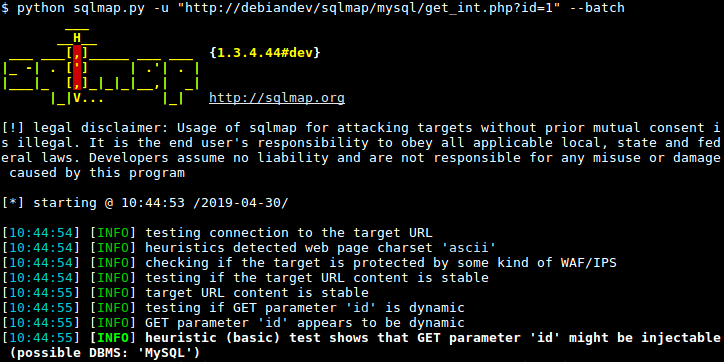
Sqlmap is an open source penetration testing tool that automates the process of detecting and exploiting SQL injection flaws and taking over of database servers. It comes with a powerful detection engine, many niche features for the ultimate penetration tester and a broad range of switches lasting from database fingerprinting, over data fetching from the database, to accessing the underlying file system and executing commands on the operating system via out-of-band connections.

How to install All Kali Linux Tools Using “Katoolin” on Debian/Ubuntu


Katoolin is a script that helps to install Kali Linux tools on your Linux distribution of choice. For those of us who like to use penetration testing tools provided by Kali Linux development team can effectively do that on their preferred Linux distribution by using Katoolin.
In this tutorial we are going to look at steps to install Katoolin on Debian based derivatives.

Major Features of Katoolin

  1. Adding Kali Linux repositories.
  2. Removing Kali Linux repositories.
  3. Installing Kali Linux tools.

Requirements

Requirements for installing and using Katoolin.
  1. An operating system for this case we are using Ubuntu 14.04 64-bit.
  2. Python 2.7

Installing Katoolin

To install Katoolin run the following commands.
# apt-get install git
# git clone https://github.com/LionSec/katoolin.git && cp katoolin/katoolin.py /usr/bin/katoolin

OUTPUT

cp katoolin/katoolin.py /usr/bin/katoolin
Cloning into 'katoolin'...
remote: Counting objects: 52, done.
remote: Total 52 (delta 0), reused 0 (delta 0), pack-reused 52
Unpacking objects: 100% (52/52), done.
Checking connectivity... done.

Then make /usr/bin/katoolin executable by running the command below.

# chmod +x /usr/bin/katoolin

Now you can run Katoolin as follows.
# katoolin
The output below shows the interface of Katoolin when you run the command.
As you can see it provides a menu from which you can make selections of what you want to do.
Incase the above way of installation fails, you also can try the following steps.
Go to https://github.com/LionSec/katoolin.git page download the zip file and extract it.
# wget https://github.com/LionSec/katoolin/archive/master.zip
# unzip master.zip
After extracting, you should be able to find katoolin.py script. Run katoolin.py command, you will be able to view the output similar to above.
# cd katoolin-master/
# chmod 755 katoolin.py
#  ./katoolin.py 

How do I use Katoolin?

To add Kali Linux repositories and update repositories, select option 1 from the Menu.
1) Add Kali repositories & Update 
2) View Categories
3) Install classicmenu indicator
4) Install Kali menu
5) Help
kat > 1
1) Add kali linux repositories
2) Update
3) Remove all kali linux repositories
4) View the contents of sources.list file
What do you want to do ?> 1
Sample Output
Executing: gpg --ignore-time-conflict --no-options --no-default-keyring --homedir /tmp/tmp.DC9QzwECdM --no-auto-check-trustdb --trust-model always --keyring /etc/apt/trusted.gpg --primary-keyring /etc/apt/trusted.gpg --keyserver pgp.mit.edu --recv-keys ED444FF07D8D0BF6
gpg: requesting key 7D8D0BF6 from hkp server pgp.mit.edu
gpg: key 7D8D0BF6: public key "Kali Linux Repository <devel@kali.org>" imported
gpg: Total number processed: 1
gpg:               imported: 1  (RSA: 1)
Then you can select option 2 from the interface above to update the repositories. From the output below, I have only captured a portion where Kali Linux repositories are being updated so that one can install Kali Linux tools in Ubuntu.
What do you want to do ?> 2
Ign http://in.archive.ubuntu.com vivid InRelease                                                                                            
Ign http://security.ubuntu.com vivid-security InRelease                                                                                                               
Ign http://in.archive.ubuntu.com vivid-updates InRelease                                                                                                               
Get:1 http://security.ubuntu.com vivid-security Release.gpg [933B]                                                                                                    
Ign http://in.archive.ubuntu.com vivid-backports InRelease                                                                                                                      
Get:2 http://repo.kali.org kali-bleeding-edge InRelease [11.9 kB]                                                                              
Get:3 http://security.ubuntu.com vivid-security Release [63.5 kB]                                                            
Hit http://in.archive.ubuntu.com vivid Release.gpg                                                                              
Get:4 http://repo.kali.org kali-bleeding-edge/main amd64 Packages [8,164 B]                                                
Get:5 http://in.archive.ubuntu.com vivid-updates Release.gpg [933 B]                                                                
Get:6 http://repo.kali.org kali-bleeding-edge/main i386 Packages [8,162 B]                                               
Hit http://in.archive.ubuntu.com vivid-backports Release.gpg    
...  
If you want to delete the Kali Linux repositories you added, then select option 3.
What do you want to do ?> 3
All kali linux repositories have been deleted !
As part of its operation, the Apt package uses a /etc/apt/sources.list that lists the ‘sources‘ from which you can obtain and install other packages.
To view contents of /etc/apt/sources.list file, select of 4.
What do you want to do ?> 4
#deb cdrom:[Ubuntu 15.04 _Vivid Vervet_ - Release amd64 (20150422)]/ vivid main restricted
# See http://help.ubuntu.com/community/UpgradeNotes for how to upgrade to
# newer versions of the distribution.
deb http://in.archive.ubuntu.com/ubuntu/ vivid main restricted
deb-src http://in.archive.ubuntu.com/ubuntu/ vivid main restricted
## Major bug fix updates produced after the final release of the
## distribution.
deb http://in.archive.ubuntu.com/ubuntu/ vivid-updates main restricted
deb-src http://in.archive.ubuntu.com/ubuntu/ vivid-updates main restricted
...
To go back you can simply type back and press [Enter] key.
What do you want to do ?> back
1) Add Kali repositories & Update 
2) View Categories
3) Install classicmenu indicator
4) Install Kali menu
5) Help
kat > 
To go back to the main menu, simply type gohome and press [Enter] key.
kat > gohome
1) Add Kali repositories & Update 
2) View Categories
3) Install classicmenu indicator
4) Install Kali menu
5) Help
kat >
There are different categories of Kali Linux tools you can install on your Ubuntu using Katoolin.
To view the available categories, select option 2 from the main menu.
kat > 2
**************************** All Categories *****************************
1) Information Gathering   8) Exploitation Tools
2) Vulnerability Analysis   9) Forensics Tools
3) Wireless Attacks    10) Stress Testing
4) Web Applications    11) Password Attacks
5) Sniffing & Spoofing    12) Reverse Engineering
6) Maintaining Access    13) Hardware Hacking
7) Reporting Tools     14) Extra
0) All
Select a category or press (0) to install all Kali linux tools .
You can select a category of choice or install all available Kali Linux tools by selecting option (0) and press[Enter] to install.
You can also install a ClassicMenu indicator using Katoolin.
    1. ClassicMenu Indicator is a application indicator for the top panel of Ubuntu’s Unity desktop environment.
    2. ClassicMenu Indicator provides a simple way for you to get a classic GNOME-style application menu for those who prefer this over the default Unity dash menu.
To install classicmenu indicator, press y and press [Enter].
kat > back
1) Add Kali repositories & Update 
2) View Categories
3) Install classicmenu indicator
4) Install Kali menu
5) Help
kat > 3
ClassicMenu Indicator is a notification area applet (application indicator) for the top panel of Ubuntu's Unity desktop environment.
It provides a simple way to get a classic GNOME-style application menu for those who prefer this over the Unity dash menu.
Like the classic GNOME menu, it includes Wine games and applications if you have those installed.
For more information , please visit : http://www.florian-diesch.de/software/classicmenu-indicator/
Do you want to install classicmenu indicator ? [y/n]> y
This PPA contains the most recent alpha/beta releases for
 * Arronax http://www.florian-diesch.de/software/arronax/
 * ClassicMenu Indicator http://www.florian-diesch.de/software/classicmenu-indicator/
* Privacy Indicator http://www.florian-diesch.de/software/indicator-privacy/
 * RunLens http://www.florian-diesch.de/software/runlens/
 * Unsettings http://www.florian-diesch.de/software/unsettings/
 * UUdeLens http://www.florian-diesch.de/software/uudelens
More info: https://launchpad.net/~diesch/+archive/ubuntu/testing
Press [ENTER] to continue or ctrl-c to cancel adding it
gpg: keyring `/tmp/tmpaqk6fphl/secring.gpg' created
gpg: keyring `/tmp/tmpaqk6fphl/pubring.gpg' created
...
You can also install Kali menu in Ubuntu by select option 4 and press y and then press [Enter].

THC-Hydra - Very Fast Network Logon Cracker - How to use

cracking login password     Number one of the biggest security holes are passwords, as every password security study shows. Hydra is a parallized login cracker which supports numerous protocols to attack. New modules are easy to add, beside that, it is flexible and very fast.  This fast, and many will say fastest network logon cracker supports many different services. Deemed ‘The best parallelized login hacker’: for Samba, FTP, POP3, IMAP, Telnet, HTTP Auth, LDAP, NNTP, MySQL, VNC, ICQ, Socks5, PCNFS, Cisco and more. Includes SSL support and is part of Nessus.
Link download: THC-Hydra v8.2 Released
Very Fast Network Logon Cracker: THC-Hydra Very Fast Network Logon Cracker: THC-Hydra

Install Hydra

$ cd /data/src/
$ wget http://www.thc.org/releases/hydra-8.1.tar.gz
$ tar xzvf hydra-8.1.tar.gz
$ cd hydra-8.1/
$ ./configure
$ make
$ sudo make install
If you want the ssh module, you have to setup libssh (not libssh2!) on your system, get it from http://www.libssh.org, for ssh v1 support you also need to add “-DWITH_SSH1=On” option in the cmake command line.

If you use Ubuntu/Debian, this will install supplementary libraries needed for a few optional modules:

apt-get install libssl-dev libssh-dev libidn11-dev libpcre3-dev libgtk2.0-dev libmysqlclient-dev libpq-dev libsvn-dev firebird2.1-dev libncp-dev

Hydra was tested and compiles on:

All UNIX platforms (linux, *bsd, solaris, etc.)
Mac OS/X
Windows with Cygwin (both IPv4 and IPv6)
Mobile systems based on Linux, Mac OS/X or QNX (e.g. Android, iPhone, Blackberry 10, Zaurus, iPaq)

Syntax

$ hydra [[[-l LOGIN|-L FILE] [-p PASS|-P FILE]] | [-C FILE]] [-e ns]
[-o FILE] [-t TASKS] [-M FILE [-T TASKS]] [-w TIME] [-f] [-s PORT] [-S] [-vV]
server service [OPT]
If you just enter “hydra”, you will see a short summary of the important options available. Type “./hydra -h” to see all available command line options. For Linux users, a GTK gui is available, try “./xhydra”

Restoring an aborted session

When hydra is aborted with Control-C, killed or crashs, it leavs a “hydra.restore” file behind which contains all necessary information to restore the session. This session file is written every 5 minutes.
NOTE: the hydra.restore file can NOT be copied to a different platform (e.g. from little indian to big indian, or from solaris to aix)

How To Scan/Crack Over a Proxy

The environment variable HYDRA_PROXY_HTTP defines the web proxy (this works just for the http/www service!).
The following syntax is valid:
HYDRA_PROXY_HTTP="http://123.45.67.89:8080/"
For all other services, use the HYDRA_PROXY variable to scan/crack via by default a web proxy’s CONNECTcall. It uses the same syntax.
HYDRA_PROXY=[http|socks4|socks5]://proxy_addr:proxy_port
Example:
HYDRA_PROXY=http://proxy.anonymizer.com:8000
If you require authentication for the proxy, use the HYDRA_PROXY_AUTH environment variable:
HYDRA_PROXY_AUTH="the_login:the_password"
Currently THC-Hydra supports:

  • Asterisk,
  • AFP,
  • Cisco AAA,
  • Cisco auth,
  • Cisco enable,
  • CVS, Firebird,
  • FTP,
  • HTTP-FORM-GET,
  • HTTP-FORM-POST,
  • HTTP-GET,
  • HTTP-HEAD,
  • HTTP-PROXY,
  • HTTPS-FORM-GET,
  • HTTPS-FORM-POST,
  • HTTPS-GET,
  • HTTPS-HEAD,
  • HTTP-Proxy,
  • ICQ,
  • IMAP,
  • IRC,
  • LDAP,
  • MS-SQL,
  • MYSQL,
  • NCP,
  • NNTP,
  • Oracle Listener,
  • Oracle SID,
  • Oracle,
  • PC-Anywhere,
  • PCNFS,
  • POP3,
  • POSTGRES,
  • RDP,
  • Rexec,
  • Rlogin,
  • Rsh,
  • S7-300,
  • SAP/R3,

  • SIP,
  • SMB,
  • SMTP,
  • SMTP Enum,
  • SNMP,
  • SOCKS5,
  • SSH (v1 and v2),
  • Subversion,
  • Teamspeak (TS2),
  • Telnet,
  • VMware-Auth,
  • VNC and
  • XMPP.

                                                                                       For HTTP, POP3, IMAP and SMTP, several login mechanisms like plain and MD5 digest etc. are supported.
THIS TOOL IS FOR LEGAL PURPOSES ONLY! LINK


Parrot Security OS

Cloud oriented pentesting distribution


Based on Debian and developed by Frozenbox network

System Specs

  • Debian jessie core
  • Custom hardened linux 4.5 kernel
  • Rolling release upgrade line
  • MATE desktop environment
  • Lightdm Display Manager
  • Custom themes, icons and wallpapers

System Requirements

  • CPU: at least 1Ghz dual core cpu
  • ARCH: 32bit, 64bit and ARMhf
  • RAM: 256Mb – 512Mb suggested
  • GPU: No graphic acceleration required
  • HDD Standard: 6Gb used – 8Gb suggested
  • HDD Full: 8Gb used – 16Gb suggested
  • BOOT: Legacy bios or UEFI (testing)

Cloud

  • Parrot Server Edition
  • Parrot Cloud Controller
  • Parrot VPS Service
  • Custom installation script for Debian VPS

Programming

  • FALCON Programming Language (1.0)
  • System editor tuned for programming
  • Many compilers and debuggers available
  • Reverse Engineering Tools
  • Programming Template Files
  • Pre-installed most-used libs
  • Full Qt5 development framework
  • Full .net/mono development framework
  • Development frameworks for embedded devices

Digital Forensics

  • “Forensic” boot option to avoid boot automounts
  • Most famous Digital Forensic tools and frameworks out of the box
  • Reliable acquisition and imaging tools
  • Top class analysis softwares
  • Evidence management and reporting tools
  • Disabled automount
  • Software blockdev write protection system

Cryptography

  • Custom Anti Forensic tools
  • Custom interfaces for GPG
  • Custom interfaces for cryptsetup
  • Support for LUKS, Truecrypt and VeraCrypt
  • NUKE patch for cryptsetup LUKS disks
  • Encrypted system installation

Anonymity

  • AnonSurf
  • Entire system anonymization
  • TOR and I2P out of the box
  • DNS requests anonymization
  • “Change Identity” function for AnonSurf
  • BleachBit system cleaner
  • NoScript plugin
  • UserAgentOverrider plugin
  • Browser profile manager
  • RAM-only browser profile
  • Pandora’s Box – RAM cleaner
  • Hardened system behaviour

Parrot Security OS is a security oriented operating system designed for Pentesting, Computer Forensic, Reverse engineering, Hacking, Cloud pentesting, privacy/anonimity and cryptography

The pre-installed tools in this distro are only a small part of all the tools available in our main repository, so if you need a non-listed tool, feel free to install it through our software center (Synaptic Package Manager) included in the system.
Parrot OS Github
Parrot on Github
Parrot includes a set of metapackages to easily install further tools

par2
Parrot Security OS is a distro designed for people who love programming. It comes with interpreters and compilers for the most famous programming languages. Moreover,  right click on your desktop or on a file manager window and you can access a handy drop down menu which allows instant creation of files with custom extension divided by category. You can create html, css, javascript, php, ruby , perl, python, falcon files and many others on the fly.
Frozenbox network has forged good relations with the “pirate crew” – a gang of time wasting pirates drinking rum on the bridge of their ship. The name Parrot, is inspired by a parrot a captain’s shoulder – inevitable element in all the cartoons about pirates.
We hope that you will appreciate this distro  as much as we did – and still are. Our tests proved it to be stable and ‘perfectly’-working  – as well as elegant, lightweight and powerful 

TOP 6 LINUX CLIENT DISTROS OF LINUX 2016 SAY YOUR THINKING


  1. Linux Mint

    Linux Mint is the best operating system for desktops and powerful laptops. I will go as far as calling it the Mac OS X of the Linux world. Honestly, I had not been a huge fan of Linux Mint for a long time because of unstable Cinnamon. But, as soon as the developers chose to use LTS as the base, the distro has become incredibly stable. Because the developers don’t have to spend much time worrying about keeping up with Ubuntu, they are now investing all of their time in making Cinnamon better.
  2. XUbuntu 16.04 LTS

    If you are looking at running a server, but you can’t afford or don’t want to pay a subscription fee for RHEL or SLE, then there is nothing better than Debian or CentOS. These distributions are the gold standard when it comes to community-based servers. And, they are supported for a very long time, so you won’t have to worry about upgrading your system so oftendsa
    XUbuntu is definitely a Linux based operating system for the everyday user
  3. Solus OS
    Solus is an operating system that is designed for modern PCs. Every tweak, configuration, and optimization enables us to deliver a singular, cohesive desktop experience.
    Solus is built from scratch, providing us the freedom to provide a single integrated experience without being
    beholden to the interests of other projects or corporate agendas.
  4. Elementary OS

     -
    “Elementary OS is different… a beautiful and powerful operating system that will run well even on old PCs” (Wired)
  5. OpenMandriva
    The new release candidate, OpenMandriva 3.0 RC1, introduces Chinese and Japanese translations, offers 32-bit (i586) support and fixes bugs in the GnuPG package. Further details can be found in the project's release announcement. Download (MD5):OpenMandrivaLx.3.0-RC1-PLASMA.x86_64.iso (1,863MB, torrent, pkglist).
  6. Korora Project
    Korora comes in 
    a few installable versions which include the  Cinnamon,GNOME,MATE, and Xfce
    Korora hopes to provide a complete, easy to use system for general computing which is assisted by the following:
    • Support for as much hardware as possible
    • End user desired applications as defaults (e.g. Firefox over Konqueror)
    • Ability to play all media out of the box using free software, wherever possible
    • Target specific applications for tasks with as little bloat as possible
    • Provide simple means to get support
    • Provide guides on how to use the system
    • Build a little community of happy Linux users